發表文章

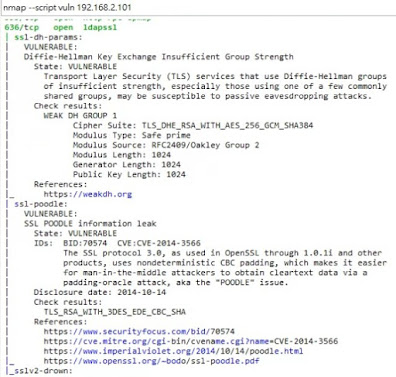
nmap vuln 查詢主機 分析

圖片
 

針對 smb-check-vulns.nse

  smb-check-vulns 已被分割成 smb-vuln-conficker.nse smb-vuln-cve2009-3103 .nse smb-vuln-ms06-025 .nse smb-vuln-ms07-029 .nse smb-vuln-regsvc-dos .nse smb-vuln-ms08-067 .nse 可以執行 nmap --script smb-vuln-*.nse

supermicro主機板-NIC

圖片
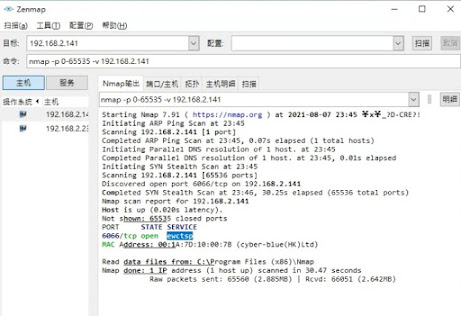
 這塊supermicro 主機板 可以做 manage 功能

ewctsp port 6606

圖片
 

hyper-V 檢查

圖片
  192.168.2.100>>MAC 是 正確形式, 且有寫 Super Micro computer 192.168.2.101~103 注意看 MAC 是 特殊形式 連續, 只寫 Microsoft 192.168.2.100 是 主要開機系統 192.168.2.101~103 全都是 hyper-V 下 系統

script 參數規則 及 命名

  -sC/--script=default:使用默認的腳本進行掃描。  --script=<Lua scripts>:使用某個腳本進行掃描  --script-args=x=x,y=y: 為腳本提供參數  --script-args-file=filename: 使用文件來為腳本提供參數  --script-trace: 顯示腳本執行過程中發送與接收的數據  --script-updatedb: 更新腳本資料庫  --script-help=<Lua scripts>: 顯示腳本的幫助信息 auth: 負責處理鑒權證書(繞開鑒權)的腳本 broadcast: 在區域網內探查更多服務開啟狀況,如dhcp/dns/sqlserver等服務  brute: 提供暴力破解方式,針對常見的應用如http/snmp等  default: 使用-sC或-A選項掃描時候默認的腳本,提供基本腳本掃描能力  discovery: 對網絡進行更多的信息,如SMB枚舉、SNMP查詢等  dos: 用於進行拒絕服務攻擊 exploit: 利用已知的漏洞入侵系統  external: 利用第三方的資料庫或資源,例如進行whois解析  fuzzer: 模糊測試的腳本,發送異常的包到目標機,探測出潛在漏洞  intrusive: 入侵性的腳本,此類腳本可能引發對方的IDS/IPS的記錄或屏蔽  malware: 探測目標機是否感染了病毒、開啟了後門等信息  safe: 此類與intrusive相反,屬於安全性腳本  version: 負責增強服務與版本掃描(Version Detection)功能的腳本  vuln: 負責檢查目標機是否有常見的漏洞(Vulnerability),如是否有MS08_067

nmap -T4 -A -v 跑出 port7070

圖片
To connect to the AnyDesk network port 80, 443 or 6568 is used. For standard listening port direct line connection is 7070 (TCP) 表示 這台有開啟anydesk

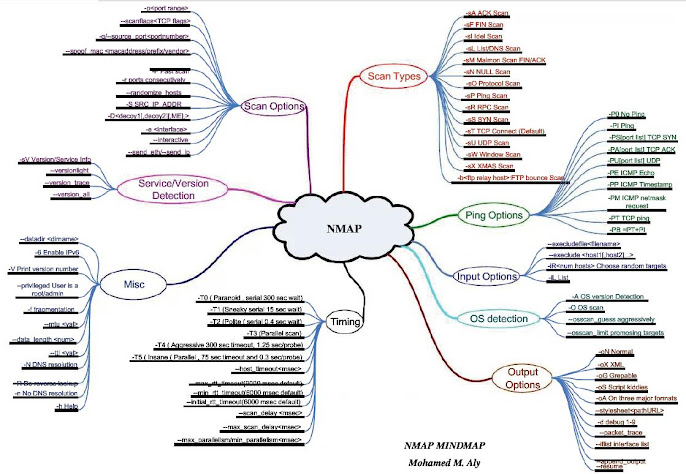
nmap-mindmap

圖片
 

nmap (找出網路是否有AD)

圖片
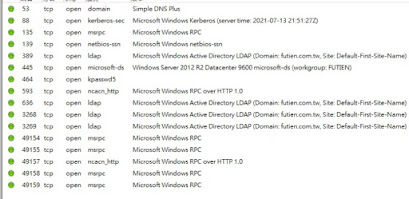
AD(active directory)(Domain controller) 這是 微軟win server特有, 找出 主控台方式  是查看網路所有電腦. 看哪台開 port:389 nmap -T4 -A -v <IP區間> 再詢問內容~查看網域名稱等資訊 nmap -sV -p 389 <IP>

snmp-sysdescr.nse 說明

圖片
                                                                                                                                                                      找尋 網路內有 snmp(port 161)顯示其資訊 指令: sudo nmap -sU -p 161 --script default,snmp-sysdescr <IP 或 range> port 162 也看看

script pptp-version.nse 說明

圖片
查詢PPTP server ~Port 1723 , 還有版本, 可推敲使用設備 Sudo nmap -Pn --script pptp-version <target IP或網域>

broadcast-sonicwall-discover.nse 說明

查詢 網路上 sonicwall 路由器, 但必須透過UDP方式 內文: local ipOps = require "ipOps" local nmap = require "nmap" local packet = require "packet" local stdnse = require "stdnse" local string = require "string" local target = require "target" description = [[ Discovers Sonicwall firewalls which are directly attached (not routed) using the same method as the manufacturers own 'SetupTool'. An interface needs to be configured, as the script broadcasts a UDP packet. The script needs to be run as a privileged user, typically root. References: * https://support.software.dell.com/kb/sw3677) ]] --- -- @usage -- nmap -e eth0 --script broadcast-sonicwall-discover -- -- @output -- | broadcast-sonicwall-discover: -- |   192.168.5.1 -- |     MAC/Serial: 0006B1001122 -- |     Subnetmask: 255.255.255.0 -- |     Firmware: 3.9.1.2 -- |_    ROM: 14.0.1.1 -- -- @args broadcast-sonicwall-discover.timeout time in seconds to wa...

broadcast-ripng-discover.nse 說明

在LAN , 傳送   RIPng Request command , 確定是否有電腦或設備 回應 nmap --script broadcast-ripng-discover 內容: local bin = require "bin" local ipOps = require "ipOps" local nmap = require "nmap" local stdnse = require "stdnse" local tab = require "tab" local table = require "table" description = [[ Discovers hosts and routing information from devices running RIPng on the LAN by sending a broadcast RIPng Request command and collecting any responses. ]] --- -- @usage -- nmap --script broadcast-ripng-discover -- -- @output -- | broadcast-ripng-discover: -- |   fe80::a00:27ff:fe9a:880c -- |     route                       metric  next hop -- |     fe80:470:0:0:0:0:0:0/64     1 -- |     fe80:471:0:0:0:0:0:0/64     1 -- |_    fe80:472:0:0:0:0:0:0/64     1 -- -- @args broadcast-ripng-discover.timeout...

broadcast-rip-discover.nse 說明

查詢LAN 裏頭, RIPv2的電腦設備, 透過發送  Request command, 取得回應 nmap --script broadcast-rip-discover 內容: local bin = require "bin" local ipOps = require "ipOps" local nmap = require "nmap" local stdnse = require "stdnse" local tab = require "tab" local table = require "table" description=[[ Discovers hosts and routing information from devices running RIPv2 on the LAN. It does so by sending a RIPv2 Request command and collects the responses from all devices responding to the request. ]] --- -- @usage -- nmap --script broadcast-rip-discover -- -- @output -- Pre-scan script results: -- | broadcast-rip-discover: -- | Discovered RIPv2 devices -- |   10.0.200.107 -- |     ip           netmask        nexthop       metric -- |     10.46.100.0  255.255.255.0  0.0.0.0       1 -- |     10.46.110.0  255.255.255.0  0.0....

指令 -T 說明

nmap 常用到  -T    , 簡單說明: -T1   傳送TCP封包 , Flag=SYN    到目標電腦的開啟port -T2   傳送空TCP封包    到目標電腦的開啟port -T3   傳送TCP封包 , Flag=SYN, URG, PSH, FIN     到目標電腦的開啟port -T4   傳送TCP封包 , Flag=ACK    到目標電腦的開啟port -T5   傳送TCP封包 , Flag=SYN     到目標電腦的關閉port -T6   傳送TCP封包 , Flag=ACK    到目標電腦的關閉port -T7   傳送TCP封包 , Flag=SYN, URG, PSH, FIN     到目標電腦的關閉port 網路封包說明: http://www.pcnet.idv.tw/pcnet/network/network_ip_tcp.htm
broadcast-pppoe-discover 說明

圖片
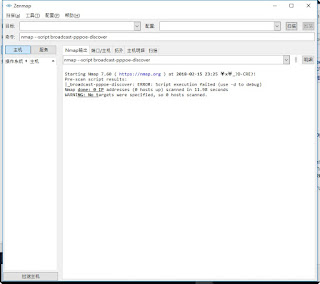
尋找網路上 PPPoE server 官方:  https://nmap.org/nsedoc/scripts/broadcast-pppoe-discover.html 內文: local nmap = require "nmap" local pppoe = require "pppoe" local stdnse = require "stdnse" local table = require "table" description = [[ Discovers PPPoE (Point-to-Point Protocol over Ethernet) servers using the PPPoE Discovery protocol (PPPoED).  PPPoE is an ethernet based protocol so the script has to know what ethernet interface to use for discovery. If no interface is specified, requests are sent out on all available interfaces. As the script send raw ethernet frames it requires Nmap to be run in privileged mode to operate. ]] --- -- @usage -- nmap --script broadcast-pppoe-discover -- -- @output -- | broadcast-pppoe-discover: -- | Server: 08:00:27:AB:CD:EF -- |   Version: 1 -- |   Type: 1 -- |   TAGs -- |     AC-Name: ISP -- |     Service-Name: test -- |     AC-Cookie: e98010ed...

broadcast-ping 說明

圖片
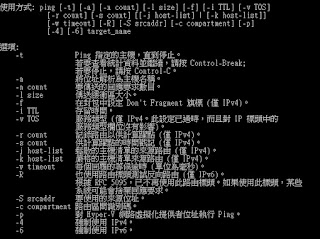
ping 這是 很常用指令... 透過ICMP方式, 去詢問LAN的電腦.. 其實與 DOS ping 類似(指令參數不同) 說明: nmap -e <interface> [--ttl <ttl>] [--data-length <payload_length>] --script broadcast-ping [--script-args [broadcast-ping.timeout=<ms>],[num-probes=<n>]] 官方:   https://nmap.org/nsedoc/scripts/broadcast-ping.html 內文: local bin = require "bin" local coroutine = require "coroutine" local ipOps = require "ipOps" local nmap = require "nmap" local packet = require "packet" local stdnse = require "stdnse" local tab = require "tab" local table = require "table" local target = require "target" local openssl = stdnse.silent_require "openssl" description = [[ Sends broadcast pings on a selected interface using raw ethernet packets and outputs the responding hosts' IP and MAC addresses or (if requested) adds them as targets.  Root privileges on UNIX are required to...

broadcast-pim-discovery 說明

發送  PIM (Protocol Independent Multicast). 的Hello 去給router , 確定是否回應 官方網址:  https://nmap.org/nsedoc/scripts/broadcast-pim-discovery.html PIM說明: http://www.networksorcery.com/enp/protocol/pim.htm 內文: local nmap = require "nmap" local packet = require "packet" local ipOps = require "ipOps" local bin = require "bin" local stdnse = require "stdnse" local target = require "target" local table = require "table" local math = require "math" local string = require "string" description = [[ Discovers routers that are running PIM (Protocol Independent Multicast). This works by sending a PIM Hello message to the PIM multicast address 224.0.0.13 and listening for Hello messages from other routers. ]] --- -- @args broadcast-pim-discovery.timeout Time to wait for responses in seconds. -- Defaults to <code>5s</code>. -- --@usage -- nmap --script broadcast-pim-discovery -- ...

broadcast-pc-duo 說明

可以找尋 LAN 裡頭 的 PC-Duo client 指令:  nmap --script broadcast-pc-duo PC-Duo 這是一套 遠端控管軟體, 類似  teamviewer... 但他 提供 中央控管與VMware 特性 http://www.vector-networks.com/it-asset-and-service-management/ITIL-ITSM-products/PC-Duo-remote-control.html 官方網址:  https://nmap.org/nsedoc/scripts/broadcast-pc-duo.html 內文: local bin = require "bin" local coroutine = require "coroutine" local nmap = require "nmap" local os = require "os" local stdnse = require "stdnse" local table = require "table" description = [[ Discovers PC-DUO remote control hosts and gateways running on a LAN by sending a special broadcast UDP probe. ]] --- -- @usage -- nmap --script broadcast-pc-duo -- -- @output -- Pre-scan script results: -- | broadcast-pc-duo: -- |   PC-Duo Gateway Server -- |     10.0.200.113 - WIN2K3SRV-1 -- |   PC-Duo Hosts -- |_    10.0.200.113 - WIN2K3SRV-1 -- -- @args broadcast-pc-duo.timeout specifies the amount of secon...

broadcast-pc-anywhere 說明

這是 用來找LAN 裡頭  可有pcanywhere 軟體client 指令:  nmap --script broadcast-pc-anywhere 官方網址:  h ttps://nmap.org/nsedoc/scripts/broadcast-pc-anywhere.html 內文: local nmap = require "nmap" local os = require "os" local stdnse = require "stdnse" local table = require "table" description = [[ Sends a special broadcast probe to discover PC-Anywhere hosts running on a LAN. ]] --- -- @usage -- nmap --script broadcast-pc-anywhere -- -- @output -- Pre-scan script results: -- | broadcast-pc-anywhere: -- |_  10.0.200.113 - WIN2K3SRV-1 -- -- @args broadcast-pc-anywhere.timeout specifies the amount of seconds to sniff --       the network interface. (default varies according to timing. -T3 = 5s) author = "Patrik Karlsson" license = "Same as Nmap--See http://nmap.org/book/man-legal.html" categories = { "broadcast", "safe" } local TIMEOUT = stdnse.parse_timespec(stdnse.get_script_args("broadcast...