發表文章

snmp-sysdescr.nse 說明

圖片
                                                                                                                                                                      找尋 網路內有 snmp(port 161)顯示其資訊 指令: sudo nmap -sU -p 161 --script default,snmp-sysdescr <IP 或 range> port 162 也看看

script pptp-version.nse 說明

圖片
查詢PPTP server ~Port 1723 , 還有版本, 可推敲使用設備 Sudo nmap -Pn --script pptp-version <target IP或網域>

broadcast-sonicwall-discover.nse 說明

查詢 網路上 sonicwall 路由器, 但必須透過UDP方式 內文: local ipOps = require "ipOps" local nmap = require "nmap" local packet = require "packet" local stdnse = require "stdnse" local string = require "string" local target = require "target" description = [[ Discovers Sonicwall firewalls which are directly attached (not routed) using the same method as the manufacturers own 'SetupTool'. An interface needs to be configured, as the script broadcasts a UDP packet. The script needs to be run as a privileged user, typically root. References: * https://support.software.dell.com/kb/sw3677) ]] --- -- @usage -- nmap -e eth0 --script broadcast-sonicwall-discover -- -- @output -- | broadcast-sonicwall-discover: -- |   192.168.5.1 -- |     MAC/Serial: 0006B1001122 -- |     Subnetmask: 255.255.255.0 -- |     Firmware: 3.9.1.2 -- |_    ROM: 14.0.1.1 -- -- @args broadcast-sonicwall-discover.timeout time in seconds to wa...

broadcast-ripng-discover.nse 說明

在LAN , 傳送   RIPng Request command , 確定是否有電腦或設備 回應 nmap --script broadcast-ripng-discover 內容: local bin = require "bin" local ipOps = require "ipOps" local nmap = require "nmap" local stdnse = require "stdnse" local tab = require "tab" local table = require "table" description = [[ Discovers hosts and routing information from devices running RIPng on the LAN by sending a broadcast RIPng Request command and collecting any responses. ]] --- -- @usage -- nmap --script broadcast-ripng-discover -- -- @output -- | broadcast-ripng-discover: -- |   fe80::a00:27ff:fe9a:880c -- |     route                       metric  next hop -- |     fe80:470:0:0:0:0:0:0/64     1 -- |     fe80:471:0:0:0:0:0:0/64     1 -- |_    fe80:472:0:0:0:0:0:0/64     1 -- -- @args broadcast-ripng-discover.timeout...

broadcast-rip-discover.nse 說明

查詢LAN 裏頭, RIPv2的電腦設備, 透過發送  Request command, 取得回應 nmap --script broadcast-rip-discover 內容: local bin = require "bin" local ipOps = require "ipOps" local nmap = require "nmap" local stdnse = require "stdnse" local tab = require "tab" local table = require "table" description=[[ Discovers hosts and routing information from devices running RIPv2 on the LAN. It does so by sending a RIPv2 Request command and collects the responses from all devices responding to the request. ]] --- -- @usage -- nmap --script broadcast-rip-discover -- -- @output -- Pre-scan script results: -- | broadcast-rip-discover: -- | Discovered RIPv2 devices -- |   10.0.200.107 -- |     ip           netmask        nexthop       metric -- |     10.46.100.0  255.255.255.0  0.0.0.0       1 -- |     10.46.110.0  255.255.255.0  0.0....

指令 -T 說明

nmap 常用到  -T    , 簡單說明: -T1   傳送TCP封包 , Flag=SYN    到目標電腦的開啟port -T2   傳送空TCP封包    到目標電腦的開啟port -T3   傳送TCP封包 , Flag=SYN, URG, PSH, FIN     到目標電腦的開啟port -T4   傳送TCP封包 , Flag=ACK    到目標電腦的開啟port -T5   傳送TCP封包 , Flag=SYN     到目標電腦的關閉port -T6   傳送TCP封包 , Flag=ACK    到目標電腦的關閉port -T7   傳送TCP封包 , Flag=SYN, URG, PSH, FIN     到目標電腦的關閉port 網路封包說明: http://www.pcnet.idv.tw/pcnet/network/network_ip_tcp.htm

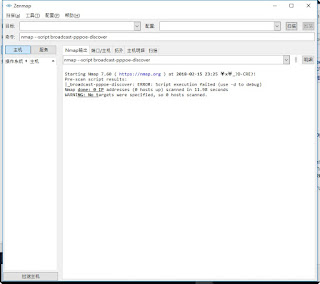
broadcast-pppoe-discover 說明

圖片
尋找網路上 PPPoE server 官方:  https://nmap.org/nsedoc/scripts/broadcast-pppoe-discover.html 內文: local nmap = require "nmap" local pppoe = require "pppoe" local stdnse = require "stdnse" local table = require "table" description = [[ Discovers PPPoE (Point-to-Point Protocol over Ethernet) servers using the PPPoE Discovery protocol (PPPoED).  PPPoE is an ethernet based protocol so the script has to know what ethernet interface to use for discovery. If no interface is specified, requests are sent out on all available interfaces. As the script send raw ethernet frames it requires Nmap to be run in privileged mode to operate. ]] --- -- @usage -- nmap --script broadcast-pppoe-discover -- -- @output -- | broadcast-pppoe-discover: -- | Server: 08:00:27:AB:CD:EF -- |   Version: 1 -- |   Type: 1 -- |   TAGs -- |     AC-Name: ISP -- |     Service-Name: test -- |     AC-Cookie: e98010ed...